
CMM-Manager software is designed to easily operate almost all CMM and Metrology hardware. These systems include manual, motorized, and portable arm CMMs as well as vision measurement systems. Keep reading to learn more about supported CMM hardware and how CMM-Manager is compatible with your CMM – More software options and info
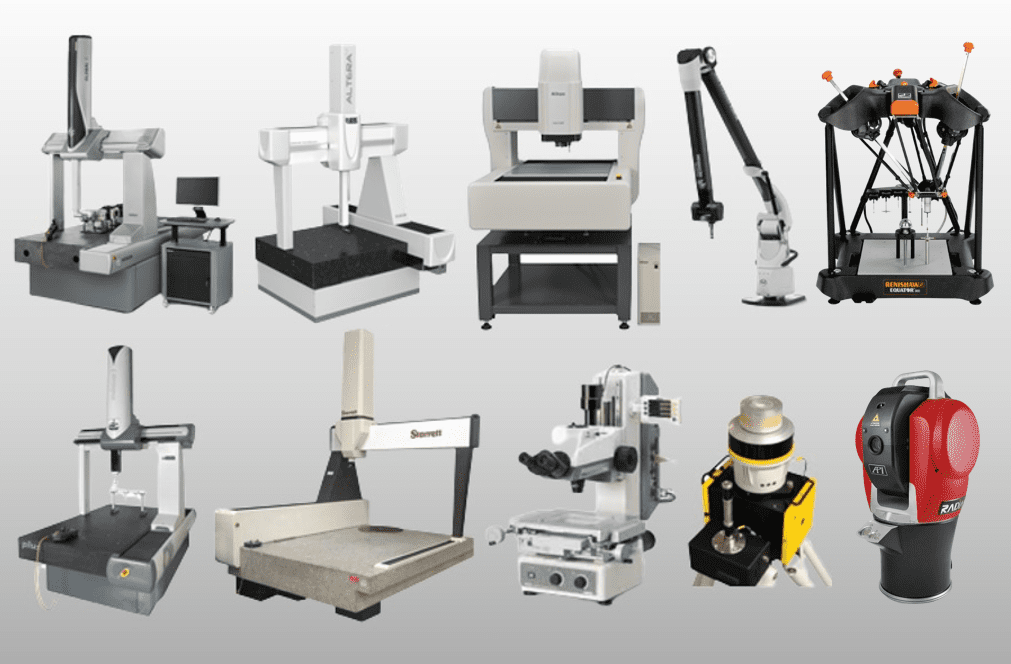
Why should I run the same software on all metrology hardware?
Running the same metrology software across your CMM, portable arm, and vision system offers major operational, technical, and financial advantages. Here’s why it makes smart business and engineering sense:
1. Unified Training & Ease of Use
- One learning curve for your team – operators and programmers only need to master a single interface.
- Simplifies onboarding and reduces errors caused by switching between different software platforms.
2. Consistent Measurement Logic
- You get identical feature definitions, alignments, tolerances, and reporting regardless of which device you use.
- Ensures results from your CMM, portable arm, and vision system are directly comparable and compliant with the same standards.
3. Shared Inspection Programs
- CMM-Manager allows shared or slightly modified programs to run across different devices.
- Great for moving inspection from offline/offsite to the shop floor or from prototype to production.
4. Streamlined Reporting
- Consistent report formats (PDF, Excel, SPC exports) help with internal reviews and external audits.
- Easier for quality engineers, production teams, and customers to read and interpret data.
5. Lower Software & Support Costs
- Fewer licenses and maintenance contracts to manage.
- Simplifies updates, tech support, and vendor relationships.
6. Better Workflow Flexibility
- Run inspections where it makes the most sense – use a portable arm at the machine, the CMM for tight tolerances, and the vision system for small or delicate parts, all with the same interface.
- Increases redundancy – if one device is down, others can take over.
Compatible CMMs
- Mitutoyo – Crysta, Apex, Bright, MiSTAR, BHN, BN, RV, FN
- Hexagon / Brown & Sharpe – Global, Classic, MicroVal, PFx, One, MicroHite
- DEA – Gamma, Iota, Mistral, Delta, Epsilon, Lambda, Swift, Validator
- Sheffield / Giddings & Lewis – Cordax, Endeavor, MEA, Discovery
- LK / Metris – Altera, Maxima, Aeros, HC-90, G80, G90, Integra
- AIMS – Revolution HB, LM, Summit
- Helmel – Phoenix, Checkmaster, Microstar
- Haas – HMM430
- Starrett – Checkmaster, HGC, RapidCheck
- Wenzel – XO, LH, XOrbit
- Zeiss / Numerex – C, Vista, Contura, Eclipse, Mauser
- zCat / Fowler – zCat
- Aberlink – Extol, Horizon, Axiom, Zenith, Azimuth
- Tarus CMM
- Coord3 CMM – Universal, Ares, Benchmark, Kronos
- Nikon – iNexiv VMA with Touch Probe
- Renishaw – Equator gauging system
5-axis ASME Automation CAD Calibration DCC DEA FARO Gear Helmel Hexagon ISO Lite LK Maintenance Manual Mitutoyo news Nikon offline PLC Portable Arm release Renishaw reporting robot Romer Sheffield SSC Standard Support Tarus Training vision Wenzel zCat Zeiss
Compatible Vision Systems
- Nikon
- iNexiv VMA
- Nexiv VMZ-R & VMZ-S
- MM-400 / 800 Microscope
- Micro-Vu
- Excel / Vertex (motorized)
- Sol (manual)
- Any Manual Measuring Microscope
- Any CMM with add-on Vision Probe
- Imaging Source USB Camera
- Deva Electronics 036 CMM Vision Probe
- Any DirectShow compatible digital camera
- Offline – Prepare programs or measure from single images Offline
- FOV – Field of View – images from FOV systems or external images such as X-Ray / radiographs
Compatible Probing Systems
CMM-Manager will operate your CMM that includes the following probing systems:
- Renishaw
- Heads – PH9, PH10, PH20, PH50, Revo, RTP20, MIP, MH8, MH20, etc.
- Probing – TP2, TP20, TP200, SP25, RSP2, RSP3
- Zeiss – ST, RDS – digital touch probe only
- Tesa – TESAStar – M, SM, HH – digital touch probe only
- zCat – VP, HP
- Portable Arms – tactile hard probes and touch probes
Compatible Portable Arms
CMM-Manager is compatible with all portable arm CMMs with tactile probing systems.
- FARO – Gold, Silver, Sterling, Bronze, Titanium, Platinum, Edge, Quantum
- Romer/ Hexagon – Infinite, Stinger, Absolute
- Kreon – Ace
- Metris – MCA I & MCA II
- Nikon – MCAx
- LK – Freedom Arm
- Tomelleri – Space / Space Plus
- RPS Metrology Arm
- Trimos – A5 / A6
- Revware – MicroScribe Arm
- 7D Kinematic Metrology – iGPS
- API – Radian Laser Tracker / vProbe
Retrofit Interface for any CMM
CMM-Manager is compatible with almost all CMMs. For non-compatible models we can help with a hardware retrofit on any CMM.
- Renishaw – UCC / I++
- Deva Electronics – 004 DCC and 037 Manual Interface
- Pantec – WPC, Eagle
- Caliper Designs – CDI PCI for manual CMM
- Insight Metrology – IMUSB
- TopMes – AX3 Manual counter
Expand the Value of Existing Equipment
Many manufacturers already own machine platforms with strong structural integrity but limited electronics, aging interfaces, or outdated operating environments. When the frame and motion system remain dependable, replacing the entire unit may not be the most efficient next step. We help organizations evaluate practical modernization paths that improve capability while preserving valuable assets.
Our team supports facilities seeking a CAD-based coordinate measuring machine workflow that aligns with current engineering and quality demands. By updating the technology around the machine, we help create a more capable inspection resource for daily production use.
Modernization Options Built Around Your Needs
We offer upgrade strategies based on machine condition, workflow goals, and future production plans. Every facility has different priorities, so we focus on the right level of improvement instead of unnecessary replacement.
Available solutions may include:
- New controller and electronics packages
- Software migration and optimization
- Enhanced reporting capabilities
- CAD-driven programming tools
- Probe communication improvements
- Operator interface updates
- System performance tuning
- Full CMM retrofit and upgrade planning
For teams comparing platforms, we also provide options that function as an MCOSmos CMM software alternative with flexible deployment and easier long-term scalability.
Operational Gains From Strategic Upgrades
Modernization can improve both technical performance and business efficiency. Instead of absorbing the cost and disruption of replacing an entire system, many organizations benefit from upgrading only what limits output.
Potential advantages include:
- Faster program creation and revisions
- Better usability for operators and engineers
- Improved data flow to quality systems
- Extended service life of existing assets
- Lower ownership costs over time
- Better readiness for future production changes
- More dependable daily operation
These improvements can support inspection teams under pressure to move faster while maintaining dimensional confidence.
Our Upgrade Process
We use a structured approach that helps reduce downtime and keeps projects focused on measurable outcomes.
Initial Review
We assess the current machine, controls, software environment, and operational goals.
Solution Mapping
We recommend the most practical path, whether software changes, electronics updates, or a complete CMM retrofit and upgrade.
Implementation
We install, configure, and validate the upgraded system for production readiness.
Knowledge Transfer
We provide user guidance so your team can transition efficiently and maximize the new environment.
Why Manufacturers Work With Us
We understand that metrology investments must support production schedules, quality targets, and budget realities. Our recommendations are based on usable results, not generic sales approaches. We work with organizations that need a reliable path forward for aging systems while maintaining confidence in inspection output.
Whether you need a CAD-based coordinate measuring machine process, expanded software capability, or an MCOSmos CMM software alternative, we focus on solutions that fit your operation.
Request Your Upgrade Consultation
If legacy hardware is limiting efficiency, now is the time to explore a smarter path forward. Contact QxSoft today to discuss your CMM retrofit options, modernization goals, or complete upgrade strategy. We are ready to help you turn existing equipment into a stronger long-term asset.
Frequently Asked Questions
A professional evaluation should review structural condition, axis performance, repeatability, and service history. If the core mechanics remain stable, modernization may provide strong value. Many companies discover they can gain years of additional use through targeted upgrades.
Yes, many modernization projects are designed to improve compatibility with current CAD files, reporting tools, and digital quality processes. This can reduce manual workarounds that older systems often require. Better integration also supports faster communication between engineering and inspection teams.
Project scope determines downtime, but careful planning can minimize disruption. Some facilities schedule upgrades around maintenance windows or lower-volume periods. A phased implementation plan can help maintain production continuity.
Some teams want easier navigation, broader compatibility, or a different support model. Others need software that better matches changing inspection demands. Reviewing alternatives can uncover options that improve flexibility and long-term value.
Upgrades often cost less than full equipment replacement while improving day-to-day performance. They can also reduce service risks tied to obsolete parts and unsupported systems. Over time, efficiency gains may further strengthen return on investment.