
CMM-Manager 2026 introduces several enhancements aimed at improving measurement efficiency, accuracy, report customization, and overall user experience.
The key new functionalities in this release include:
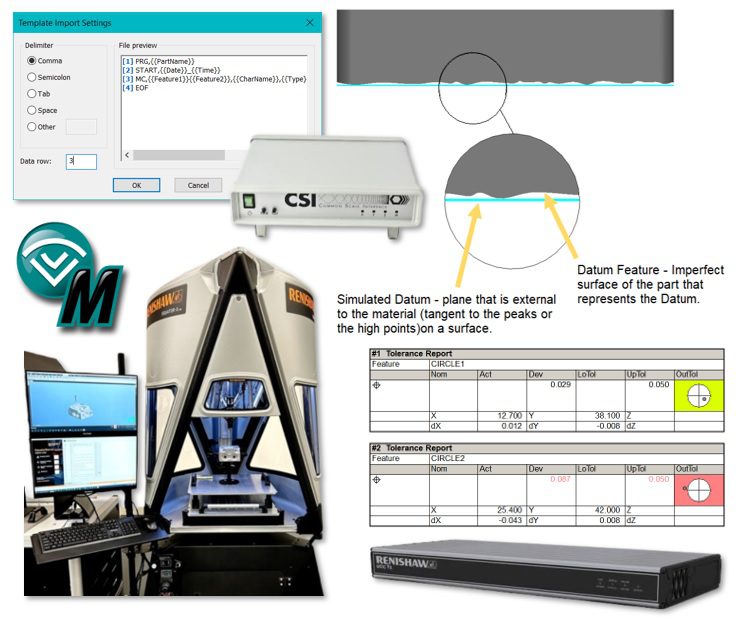
📊 Position Report Graphical Charting
Add a new visual graphic to better show the position deviation for circle, cylinder, cone, and slot features.
🛠️ User Customizable CSV Report Format
Template driven flexible text reporting tool allows user to create their own custom report formats.
🎯 Simulated Mating Surface Plane Fitting Algorithm
ASME Y14.5.1-2019 – Plane Fitting. Added new constrained plane fitting algorithms: Constrained L1, Constrained L2, Constrained Min/Max
🧭 Renishaw UCC Direct Driver (3.0)
20-40% increased throughput. Block execution and Fly Radius modes. Increased communication efficiency
💻 Newly Supported Devices and Hardware
- Renishaw Equator-X
- Renishaw UCC Direct Driver 3.0
- Renishaw Equator Auto Transfer System
- Hexagon CSI (Common Scale Interface)
- Pomeas Precision Instrument – motorized zoom lens
- Deva USB standalone lighting devices
- Added par-centricity calibration for 3rd-party vision systems
🗂️ Native CAD Support:
Spatial Interop 2026 1.0
- The following formats and their versions are supported:
- ACIS R1 – 2026 1.0
- CATIA V4 4.1.9 – 4.2.4
- CATIA V5/V6 V5 R8 – V5-6 R2026
- DWG 2.5 – 2026
- Inventor V6 – 2026
- JT JT 8.x – 10.3, 10.5 – 10.10
- NX NX 1 – NX 2506
- Parasolid 9.0.x – 38.0.x
- Pro/E 16 – Creo 12.0
- Solid Edge V18 – SE 2025
- SolidWorks 2003 – 2026
- STEP AP203, AP214, AP242
- VDA-FS 1.0 – 2.0
These updates are designed to streamline inspection workflows and support advanced measurement tasks. For a comprehensive overview of all new features and enhancements, you can refer to the official release notes:
Version 2026 (12.6.1.10183)
Release Date: 12/23/2025
Required SSC Date: 01/01/2026 or later

1. Supported Operating Systems
- Windows 11 Pro or Enterprise
- Windows 10 Pro or Enterprise
* Windows 7 or 8 may still work, but not officially supported or tested
* CAD Converter 2023 and later no longer support 32-bit OS, but CAD Converter
  2022 can be used with CMM-Manager 2026 on 32-bit OS

2. Language Support
- English, Chinese, Czech, French, German, Italian, Japanese, Polish, Spanish

3. CAD Importer Support: Spatial 3D InterOp Release 2026 1.0
- The following formats and their versions are supported:
  * ACIS		R1 – 2026 1.0
  * CATIA V4	4.1.9 – 4.2.4
  * CATIA V5/V6	V5 R8 – V5-6 R2026
  * DWG         2.5 – 2026
  * Inventor	V6 – 2026
  * JT          JT 8.x – 10.3, 10.5 – 10.10
  * NX			NX 1 – NX 2506
  * Parasolid	9.0.x – 38.0.x
  * Pro/E		16 – Creo 12.0
  * Solid Edge  V18 – SE 2025
  * SolidWorks	2003 – 2026
  * STEP		AP203, AP214, AP242
  * VDA-FS		1.0 – 2.0

4. Improved Renishaw UCC Direct Driver (3.0)
- Delivers a significant 20–40% throughput increase
- Enables block execution and fly radius modes
- Seamless migration from existing UCC Direct 2.0 Driver

5. New Plane Fitting Algorithms
- Added support for simulated datum plane fitting per ASME Y14.5.1 - 2019
- Includes Constrained L1, Constrained L2, and Constrained Min/Max algorithms

6. Custom CSV Report Format
- New template driven and fully customizable text reporting tool
- Allows user to define their own custom report formats using simple tags
- Templates can be imported, exported and applied to individual or all reports
- Supports all report items, customer data and VBScript variable

7. Position Report Graphical Chart
- Visually highlight position deviation with graphical chart in lieu of color bar
- Quick identification of position/axis of the actual feature relative to
  nominal feature location
- Supports both true position and bilateral position report

8. Other Reporting Enhancements
- Added variable support for User Defined Dimension name
- Allows customization of color bar graph for report deviation
- Changed to display all texts in a report OOT row in OOT color
- Updated bilateral position calculation for Ellipse feature
- Fixed: Allows curves on different orientation planes to be selected for Line Profile
- Fixed: 3D deviation direction could be incorrect for Cloud-to-Curve report
- Fixed: 3D lower tolerance for Cloud-to-cloud report would not retain zero
- Fixed: User Notes report name could change when the report operation was revisited

9. Measurement Enhancements
- Allows creating 5-axis paths (All Axes mode) in circular pattern for both
  rectangular and circular planes
- Allows starting simulation at any command on Path page
- Allows moving multiple points up/down in list on Points page
- Added option to keep point names visible in 3D view when path tab is active
- Fixed: 5-axis CAD Teach Complex 2D might cause collision when using Fixed Quill
- Fixed: 5-axis Hole Pattern could fail to create link paths between holes
- Fixed: B angle for 5-axis touch might flip 180 degrees while measuring a feature
         that could be accessed from both sides

10. Scanning Enhancements
- Added filtering option for SP25/Revo scanned cylinder
	- Filtering is supported for all scan methods: Helical, Circles, Lines
	- Added new Helical filter type for Helical method
	- Added elimination filter
- Added support for importing points to Scan Plane/Cloud

11. Vision Enhancements
- Added support for POMEAS motorized zoom lens
- Allows Deva lighting device to be used with 3rd-party cameras
- Improved Auto Focus function on 3rd-party vision systems
- Added parcentricity calibration for 3rd-party vision systems
- Fixed: Saving Image with stitch option would fail with RGB32 format

12. Shop Floor Launcher Enhancements
- Added function to generate multiple SFL programs for batch run application
- Fixed: SFL preview image might not load or display correctly

13. Other Enhancements
- [1] Improved performance with opening and closing large programs
- [2] Added option to collapse/expand all program groups
- [3] Allows incremental option for programmed "Go To" command
- [4] Added support for Park position in "Go To" command
- [5] Added variable support for file paths in various operations
- [6] Get Probe Assembly operation should only inhibit probe after reaching safe position
- [7] Added option to force retract for tip change during Gear runout measurement
- [8] Added option to restore legacy background colors from Layout menu
- [9] All previous batch run settings should be saved
- [10] Allows DMIS construct Point from Circle and Plane (INTOF)
- [11] Added Output Raw Data option to ISO Probing Test
- [12] Improved dependency algorithm for Operation Plan auto creation
- [13] Allows iterative best-fit without micro-plane measurement in Datum Alignment
- [14] Allows defining Leap-Frog targets via key-in or importing point data
- [15] Allows overwriting existing name when saving user view
- [16] New VBScript functions: SeekMove, StopProgram, GetDmeCommandResponse, SetStatusBarMessage

14. Driver Updates
- Hexagon CSI Box (New)
	- Added support for Hexagon CSI manual CMM interface
- Leitz
	- Added option to enable joystick backoff
- LK
	- Fixed: System hang when LK controller returned erroneous probe type
- Pantec
	- Added support for Pantec error map (GEC)
	- Fixed: SP25 scan did not always start following a DCC measurement
	- Fixed: Scan speed is used for moves after a scan command
	- Fixed: Unrecognized controller errors should be reported
- Renishaw Equator/Equator-X
	- Added support for Equator-X
	- Allows auto starting Equator Server and RenCompare
	- Allows changing IP port number for Equator server
- Sheffield MP/SMP
	- Fixed: Abort command could cause 10s delay
- UCC Direct 2.0
	- Add support for using MCU F3 button to manually verify point
- UCC I++
	- Add support for using MCU F3 button to manually verify point
	- Fixed: Slow I++ sync with systems containing large number of tools
	- Fixed: Star probe dimension did not match with UCCserver
	- Fixed: I++ sync for star probe with "Adaptor" (M3-M2) incorrect
- Zeiss C99
	- Fixed: Joystick button not working on Zeiss C99L Controller
	- Fixed: Homing and triggering issue on certain C99 controller

15. Bug Fixes
- [1] Restore button on Mirror operation could cause memory leak
- [2] Composite position's lower FCF would yield excessive deviation when mirrored
- [3] Some DDE reports would not mirror correctly
- [4] Transforming hole pattern and composite position may cause software crash
- [5] Path tab for Measure Hole Pattern operation could not be Locked
- [6] Associated CAD surface was not updated after re-picking CAD
- [7] Orientation plane might be incorrect after re-picking a line from CAD
- [8] Importing points from a locked data file would cause software crash
- [9] Target feature was not displayed at runtime for Seek Hole operation
- [10] VBScript input boxes losing focus when moving mouse over Report database window
- [11] Dialog box could appear outside of the screen
- [12] Report margins in Preferences was not restored using Restore Defaults
- [13] Auto select last created feature option not working on some circle construction
- [14] Point prefix renaming issue in Points from Cloud construction

--End